In today’s digital business environment, organisations handle hundreds or even thousands of documents every day. These documents include invoices, contracts, employee records, customer information, financial reports, purchase orders, policies, and internal communications. Managing all these files manually can become time-consuming, complicated, and inefficient as a business grows.
Traditional document management methods, such as maintaining physical filing cabinets, storing files on individual computers, or sharing documents through email, often create unnecessary challenges. Employees may struggle to locate important information, work with outdated files, or spend valuable time organising paperwork.
This is where Document Management Software (DMS) becomes essential. A DMS provides a centralised digital platform that allows businesses to create, store, organise, access, share, track, and manage documents more efficiently.
But why do businesses need document management software, and how can it improve everyday operations? Let’s explore its importance and the benefits it offers to modern organisations.
What Is Document Management Software?
Document Management Software (DMS) is a digital solution designed to manage an organisation’s documents throughout their lifecycle. It helps businesses capture, store, classify, retrieve, edit, share, and archive documents from a centralised location.
Instead of relying on paper-based records or scattered digital folders, employees can use a DMS to access the documents they need through an organised system.
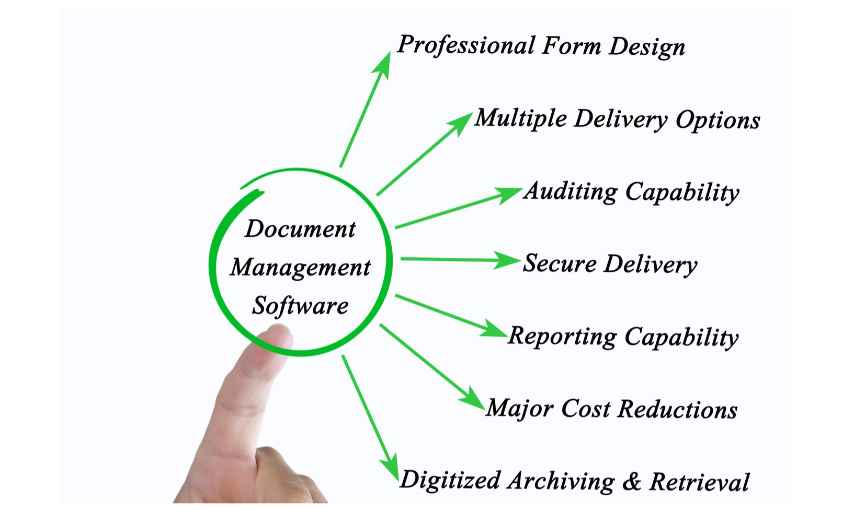
Modern document management platforms may also include advanced features such as:
- Centralised document storage: Store business documents in one organised location.
- Document indexing and search: Find files using keywords, metadata, tags, or document details.
- Version control: Track document changes and maintain previous versions.
- Access permissions: Control who can view, edit, download, or share specific files.
- Workflow automation: Automate document approvals, reviews, and routing.
- Audit trails: Monitor document activities and maintain records of changes.
- Integration capabilities: Connect document management with other business applications.
These features help organisations reduce manual work, improve document security, and create more organised business processes.
10 Reasons Why Businesses Need Document Management Software
1. Centralised Document Storage and Organisation
One of the biggest challenges businesses face is managing documents stored across multiple locations. Important files may be scattered across employees’ computers, email inboxes, shared drives, and physical filing cabinets.
This makes document management difficult, particularly when multiple departments need access to the same information.
Document Management Software solves this problem by providing a centralised repository where authorised employees can store and organise business documents.
Documents can be classified according to departments, projects, clients, document types, or other relevant categories.
For example, an accounting department can maintain invoices and financial reports, while the HR department can organise employee records and recruitment documents within the same system.
A centralised storage system reduces duplication, improves accessibility, and helps employees maintain better control over business information.
2. Save Time and Improve Employee Productivity
Employees often spend a considerable amount of time searching for documents, organising folders, sending attachments, and managing paperwork.
These repetitive administrative tasks reduce the time available for more important responsibilities.
With DMS, employees can quickly locate documents using search functions, metadata, document categories, and indexing.
For example, instead of searching through hundreds of email attachments to find a customer agreement, an employee can enter the customer’s name or document number into the system.
The required file can be retrieved within seconds, depending on the system’s indexing and configuration.
By reducing manual document-related activities, businesses can improve employee productivity and allow teams to focus on important tasks.
3. Improve Document Security and Access Control
Business documents often contain confidential information, including employee details, financial records, customer information, contracts, and business strategies.
Storing these documents without proper security controls can increase the risk of unauthorised access, accidental sharing, or information loss.
Document Management Software provides security features that help businesses protect sensitive information.
Administrators can assign user roles and permissions based on job responsibilities. For example:
- HR employees can access employee-related records.
- Finance teams can manage invoices and financial documents.
- Managers can review and approve business documents.
- General employees can access only the files relevant to their work.
Additional security features may include encryption, secure authentication, access logs, and activity tracking.
These controls help organisations maintain better visibility over their documents and reduce the risks associated with uncontrolled file sharing.
4. Streamline Document Approval Workflows
Many business activities require documents to pass through multiple departments or approval levels before they can be finalised.
For example, a purchase request may need approval from a department manager, finance manager, and senior management.
Managing this process through printed documents and email communication can lead to delays, missed approvals, and unnecessary follow-ups.
Document Management Software helps automate document approval workflows.
Documents can be automatically routed to the appropriate individuals based on predefined business rules. Employees can review, approve, reject, or request changes directly within the system.
Managers can also track the current approval status and identify pending tasks.
Automated workflows reduce manual coordination and help businesses complete document-related processes more efficiently.
5. Maintain Document Version Control
When multiple employees work on the same document, maintaining the correct version can become challenging.
For example, an employee may update a business proposal and share it through email. Another team member might continue editing an older version, creating confusion about which document contains the latest information.
This can lead to errors, duplicated work, and incorrect business decisions.
A DMS with version control helps prevent these problems by maintaining a history of document changes.
Employees can identify the latest version, review previous revisions, and understand who made specific changes, depending on the platform’s capabilities.
Version control is particularly useful for organisations managing contracts, policies, technical documentation, project reports, and other frequently updated files.
6. Support Remote Work and Team Collaboration
Modern businesses increasingly operate through hybrid and remote working arrangements. Employees may work from different offices, cities, or countries.
Traditional paper-based document management makes collaboration difficult because employees often need to be physically present to access or review specific files.
Document Management Software makes digital collaboration easier by allowing authorised users to access documents through a centralised platform.
Depending on the software, employees can:
- Access business documents remotely.
- Share files with authorised team members.
- Review and update documents.
- Track document changes.
- Collaborate across departments.
- Access information without relying on physical paperwork.
This improves communication between teams and supports a more flexible working environment.
7. Reduce Paperwork and Operational Costs
Maintaining physical documents requires paper, printing equipment, filing cabinets, storage space, and administrative resources.
As businesses grow, the cost of managing physical records can increase significantly.
Document Management Software helps organisations move towards paperless document management by digitising records and storing them electronically.
This can reduce expenses associated with:
- Printing and photocopying.
- Paper and stationery.
- Physical document storage.
- Document transportation.
- Manual filing and retrieval.
- Administrative handling.
Businesses can also reduce the physical space required to maintain records.
Although implementing DMS involves software, infrastructure, and training costs, it can deliver long-term operational savings when properly planned and implemented.
8. Improve Compliance and Audit Readiness
Businesses operating in regulated industries often need to maintain accurate records and demonstrate how important documents are managed.
Industries such as healthcare, finance, education, manufacturing, and legal services may have specific requirements relating to document retention, privacy, access, and recordkeeping.
Managing these requirements manually can be difficult, particularly when documents are spread across multiple storage locations.
Document Management Software can support compliance by providing features such as:
- Document access permissions.
- Audit trails and activity logs.
- Document retention policies.
- Version history.
- Secure document storage.
- Document approval records.
These capabilities make it easier for organisations to track document-related activities and retrieve information when required.
However, using DMS alone does not guarantee regulatory compliance. Businesses must configure the system according to applicable legal, industry, and organisational requirements.
9. Reduce the Risk of Document Loss
Important business documents can be lost due to accidental deletion, hardware failure, physical damage, employee mistakes, or unexpected incidents.
Losing critical records can disrupt business operations and create additional costs.
A Document Management System helps reduce these risks through digital storage and backup capabilities.
Depending on the solution, documents may be protected through automated backups, cloud storage, recovery options, and controlled access.
Businesses should also establish suitable backup schedules, disaster recovery procedures, and data retention policies.
With an effective document management strategy, organisations can improve document availability and protect important business information against unexpected disruptions.
10. Scale Document Management as Your Business Grows
A document management process that works for a small business may become inefficient when the organisation expands.
More employees, customers, departments, projects, and transactions mean more documents to manage.
Without an organised system, businesses may experience increasing storage problems, duplicated files, inconsistent processes, and difficulties retrieving information.
Document Management Software provides a scalable approach to managing growing document volumes.
Businesses can introduce additional users, departments, document categories, and workflows as their requirements change, depending on the software’s capacity and licensing.
This makes DMS a valuable long-term investment for organisations planning to expand their operations.
Key Features to Look for in Document Management Software
Choosing the right document management solution is important because every organisation has different operational requirements.
Before implementing a DMS, businesses should evaluate the following features:
- Centralised Storage: Keeps business documents organised in one location.
- Advanced Search: Helps employees retrieve files quickly using keywords and filters.
- Version Control: Maintains document revision history and tracks changes.
- Workflow Automation: Simplifies document approvals and routing processes.
- Access Control: Protects confidential business information through user permissions.
- Audit Trails: Tracks document activities, updates, and changes.
- Cloud Accessibility: Allows authorised employees to access documents remotely.
- Integration: Connects DMS with existing business applications and systems.
- Backup and Recovery: Helps protect important business records against data loss.
- Reporting: Provides visibility into document activities and management processes.
Businesses should also consider ease of use, implementation requirements, scalability, technical support, and the total cost of ownership before selecting a solution.
Which Businesses Can Benefit from Document Management Software?
Document Management Software is useful for organisations of different sizes and across various industries.
Some examples include:
- Healthcare organisations: Manage patient records, medical reports, administrative documents, and internal approvals with appropriate access restrictions.
- Educational institutions: Organise student records, admission documents, examination papers, certificates, and administrative files.
- Financial organisations: Manage invoices, financial statements, transaction records, customer documentation, and approval processes.
- Manufacturing companies: Maintain quality documents, production reports, supplier records, technical manuals, and compliance documentation.
- Legal firms: Organise contracts, case files, agreements, legal correspondence, and confidential client documents.
- Corporate businesses: Manage HR records, employee onboarding documents, policies, financial reports, purchase requests, and internal communications.
Regardless of industry, any organisation that regularly creates, receives, stores, or processes documents can benefit from a structured document management approach.
How to Choose the Right Document Management Software
Selecting the right DMS requires understanding your current document management challenges and future business requirements.
Here are a few important considerations:
- Understand your business requirements: Identify the types of documents you manage and the problems you want to solve.
- Evaluate workflow requirements: Check whether the software supports your existing approval and document routing processes.
- Check security features: Look for role-based access, authentication, encryption, and audit capabilities.
- Consider integration: Ensure the system can work with your existing business applications.
- Evaluate scalability: Choose a solution that can support increasing document volumes and users.
- Check usability: Make sure employees can easily learn and use the platform.
- Review support and implementation: Consider training, technical assistance, maintenance, and ongoing support.
The right solution should simplify everyday document management rather than introduce unnecessary complexity.
Conclusion
Document Management Software is no longer just a digital storage solution. It has become an important business tool for improving productivity, organising information, strengthening document security, and streamlining everyday operations.
From centralised document storage and automated approval workflows to version control and remote collaboration, a well-implemented DMS helps businesses manage their information more effectively.
As organisations continue to grow and adopt digital working practices, having a reliable document management system can make a significant difference in operational efficiency and information management.
If your business is still relying on manual paperwork, scattered folders, or email-based document approvals, it may be time to consider a smarter approach.
Explore how Pericent’s document management solutions (docEdge DMS) can help your organisation simplify document handling, improve workflow efficiency, and move towards a more organised digital workplace.