Every business generates and handles a large number of documents daily. From invoices and customer records to employee files, contracts, project reports, and financial statements, managing this information efficiently is essential for smooth business operations.
However, many organisations still rely on scattered digital folders, email attachments, spreadsheets, and physical filing cabinets to store important documents. As a business grows, these traditional methods can create challenges such as misplaced files, duplicate records, security risks, and delays in retrieving information.
A Centralised Document Management System (DMS) provides a structured way to store, organise, access, share, and manage business documents from one central location.
Building a centralised document management system is not just about moving files into digital storage. It involves creating an organised process that improves document accessibility, security, collaboration, and workflow efficiency.
In this guide, we will explore the essential steps to build a centralised document management system for your business.
What Is a Centralised Document Management System?
A Centralised Document Management System is a digital platform that allows businesses to manage their documents through a single, organised repository.
Instead of storing files across individual computers, email accounts, and separate folders, employees can access authorised documents through one system.
A centralised DMS helps businesses manage the complete document lifecycle, including:
- Document creation and uploading.
- Document classification and indexing.
- Secure storage and retrieval.
- Document sharing and collaboration.
- Version control and tracking.
- Review and approval workflows.
- Document archiving and retention.
For example, an organisation can store HR documents, financial records, customer contracts, and project files within one DMS while maintaining separate access permissions for different departments.
8 Steps to Build a Centralised Document Management System
1. Identify Your Business Document Management Requirements
The first step is understanding how your organisation currently creates, receives, stores, and manages documents.
Every business has different document management requirements depending on its industry, size, departments, and daily operations.
Start by identifying the types of documents your organisation handles regularly.
These may include:
- Employee records and HR documents.
- Customer information and agreements.
- Invoices and financial statements.
- Contracts and legal documents.
- Project reports and business proposals.
- Purchase orders and supplier records.
- Policies, procedures, and internal documents.
Next, identify the problems employees experience with the existing document management process.
For example, are employees struggling to find files? Are different departments maintaining duplicate documents? Do approval processes take too long?
Understanding these challenges will help you determine which features and capabilities your centralised DMS should provide.
2. Choose the Right Document Management Software
After identifying your requirements, the next step is selecting suitable Document Management Software.
The right DMS should provide a centralised platform where employees can securely store, retrieve, organise, and manage documents.
When evaluating different solutions, consider the following features:
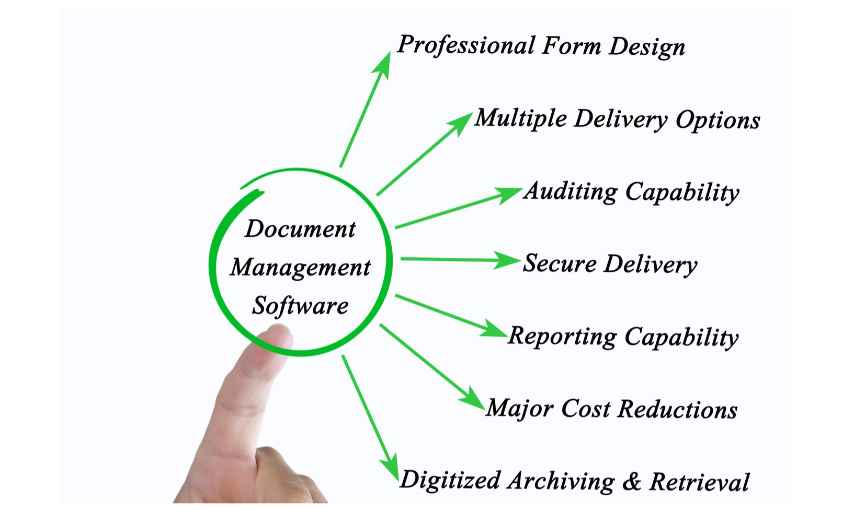
- Centralised Storage: Provides a single location for managing business documents.
- Advanced Search: Helps employees find files using keywords, metadata, and filters.
- Access Control: Allows administrators to manage document permissions.
- Version Control: Maintains previous document versions and tracks updates.
- Workflow Automation: Automates document reviews, approvals, and routing.
- Audit Trails: Records document activities and changes.
- Cloud Accessibility: Supports secure document access from different locations.
- Integration: Connects the DMS with existing business applications.
- Backup and Recovery: Helps protect important business information.
It is also important to evaluate the software’s scalability, ease of use, implementation requirements, and technical support.
Choose a solution that meets your current requirements while allowing your document management processes to grow with your organisation.
3. Create a Structured Document Classification System
Once you have selected your DMS, establish a consistent document classification structure.
Without proper organisation, a centralised repository can quickly become difficult to manage, especially when employees upload hundreds of files regularly.
Create a logical folder structure based on departments, document types, projects, customers, or other relevant business categories.
For example:
Human Resources
- Employee Records
- Recruitment Documents
- Payroll Records
- Employment Agreements
Finance
- Invoices
- Financial Reports
- Tax Documents
- Purchase Orders
Sales and Marketing
- Customer Agreements
- Sales Proposals
- Marketing Reports
- Campaign Documents
Operations
- Project Reports
- Supplier Records
- Business Policies
- Operational Documents
You should also establish standard naming conventions for files.
For example, instead of saving a file as document_final_new.pdf, use a descriptive format such as CustomerName_ServiceAgreement_2026.pdf.
Consistent classification and naming conventions make document retrieval easier and reduce confusion.
4. Set Up User Roles and Document Access Permissions
Document security is an important part of building a centralised management system.
Not every employee needs access to every business document. For example, financial records may only be accessible to authorised finance employees, while employee information should be restricted to appropriate HR personnel.
A DMS should allow administrators to define user roles and permissions according to business responsibilities.
Common access levels include:
- Administrator: Manages the system, users, settings, and permissions.
- Manager: Reviews documents and manages departmental approvals.
- Editor: Uploads, edits, and updates authorised documents.
- Viewer: Accesses documents without making changes.
- Approver: Reviews, approves, or rejects assigned documents.
Businesses should also consider secure authentication, encryption, access logs, and periodic permission reviews.
Establishing clear access policies helps protect confidential information and reduces the risk of unauthorised document access.
5. Digitise and Migrate Existing Documents
Many businesses already have large collections of physical and digital documents that need to be transferred into their new centralised system.
This process requires proper planning to avoid losing important information or creating duplicate records.
Start by reviewing existing documents and identifying which files need to be migrated.
The migration process may include:
- Collecting documents from existing storage locations.
- Identifying duplicate, outdated, or unnecessary files.
- Scanning important physical documents.
- Converting paper records into searchable digital formats using OCR where appropriate.
- Assigning document categories and metadata.
- Uploading files into the centralised repository.
- Checking document accuracy and accessibility.
It is advisable to test the migration process with a small collection of documents before transferring the entire document library.
This helps identify formatting issues, missing information, and organisational problems early.
6. Automate Document Workflows and Approval Processes
Document management involves more than storing and retrieving files. Many business documents need to pass through multiple employees or departments before they can be finalised.
For example, a purchase request may require approval from a department manager and finance manager before processing.
Managing these activities manually through emails and paper forms can lead to delays and missed communication.
Workflow automation allows businesses to define how documents move between employees and departments.
A typical document approval workflow may include:
- An employee creates or uploads a document.
- The document is automatically assigned to the relevant reviewer.
- The reviewer checks the information.
- The document is approved, rejected, or returned for changes.
- Approved documents move to the next stage.
- The system records the approval activity.
Businesses can establish automated workflows for invoices, contracts, employee onboarding, purchase requests, and other document-related processes.
This reduces repetitive administrative work and improves process visibility.
7. Train Employees and Establish Document Management Policies
Even the best document management software may not deliver the expected results if employees do not understand how to use it correctly.
Employee training is therefore an essential part of implementing a centralised DMS.
Provide practical training on:
- Uploading and organising documents.
- Using search and filtering options.
- Following document naming conventions.
- Managing document versions.
- Sharing files securely.
- Using approval workflows.
- Understanding access permissions.
In addition to training, create clear document management policies.
These policies should explain how documents are created, stored, updated, shared, archived, and deleted.
Employees should also understand their responsibilities when handling confidential business information.
Consistent processes across departments help maintain an organised document repository over time.
8. Monitor, Maintain, and Improve the System
Building a centralised document management system is an ongoing process.
As your business grows, document volumes, user requirements, and operational workflows may change.
Regular monitoring helps ensure that the DMS continues to meet organisational needs.
Businesses should periodically review:
- Document storage and organisation.
- User access permissions.
- Document approval times.
- Duplicate and outdated records.
- System performance and availability.
- Backup and recovery procedures.
- Security logs and unusual activities.
- Employee feedback and system usability.
You should also review whether existing workflows can be simplified or automated further.
Regular maintenance and improvements help businesses maintain an efficient and reliable document management environment.
Benefits of a Centralised Document Management System
Implementing a centralised DMS can improve several aspects of business operations.
- Improved Document Accessibility: Employees can find and access authorised documents from one organised platform instead of searching through multiple storage locations.
- Increased Productivity: Advanced search and automated workflows reduce time spent on repetitive administrative activities.
- Better Document Security: Access permissions, authentication, and audit trails help organisations protect confidential information.
- Improved Collaboration: Teams can share, review, and manage documents more effectively across departments and locations.
- Reduced Operational Costs: Digital document management can reduce paper consumption, printing expenses, physical storage requirements, and manual handling.
- Better Document Control: Version history and document tracking help employees work with accurate and updated information.
- Scalability: A structured DMS can support increasing document volumes, users, and business requirements.
Conclusion
Building a centralised document management system is an important step towards improving business efficiency and digital transformation.
By identifying document management requirements, selecting suitable software, establishing classification structures, implementing access controls, migrating existing records, and automating workflows, organisations can create a more organised approach to managing business information.
However, successful implementation also depends on employee training, consistent document management policies, regular monitoring, and ongoing system improvements.
With the right Document Management Software, businesses can reduce manual paperwork, improve collaboration, strengthen document security, and make important information easier to access.
Looking to simplify your organisation’s document management processes? Explore docEdge DMS to discover how centralised document storage, workflow automation, and improved document control can support your business operations.