
Businesses handle hundreds of tasks every day, from processing customer requests and managing employee records to approving invoices and handling important documents. When these activities depend on emails, spreadsheets, paper forms and manual communication, managing them can become complicated and time-consuming.
As businesses grow, these challenges become even more noticeable. Employees may struggle to track pending tasks, approvals may get delayed, and important information can become difficult to locate.
This is where Business Process Management (BPM) software becomes valuable. It helps organisations design, automate decisions , manage and monitor their everyday business processes through structured digital workflows.
But how does BPM software actually work? What features should businesses look for, and how can it improve daily operations? Let’s explore.
What Is BPM Software?
Business Process Management (BPM) software is a digital solution that helps organisations manage and improve their business processes. It provides a centralised environment where businesses can design workflows, assign responsibilities, automate repetitive activities and monitor process performance.
Instead of relying on manual communication and disconnected applications, employees can follow predefined workflows that guide each task from initiation to completion.
For example, consider a company that requires management approval before purchasing new equipment. Without BPM software, an employee might send an email to their manager, wait for a response and then forward the approval to the finance department.
With BPM software, the employee can submit a digital purchase request. The system automatically forwards it to the appropriate manager, notifies the finance team after approval and maintains a record of the entire process.
This makes business operations more organised, transparent and manageable.
How Does BPM Software Work?
BPM software works by converting everyday business activities into structured digital workflows. These workflows define what needs to happen, who is responsible for each activity and what actions should follow.
Most BPM solutions follow five important stages.
1. Process Design
The first step is identifying and understanding existing business processes.
An organisation examines how a particular activity is currently performed, identifies the people involved and determines where improvements are needed.
For example, a company might review its employee onboarding process to understand how HR, IT and department managers coordinate new employee registrations.
BPM software allows users to design workflows that clearly define each activity, responsibility and approval requirement.
2. Process Modelling
Once the process is identified, it is represented visually using workflow diagrams or process models.
These models show how tasks move between employees, departments and systems.
For example, an invoice approval workflow might include:
- Invoice submission by the accounts team.
- Initial document verification.
- Manager approval.
- Finance department review.
- Payment processing.
- Final record storage.
Visual process modelling helps businesses understand the complete workflow before implementing it.
3. Process Execution and Automation
After designing the workflow, the organisation implements it through BPM software.
The system automatically assigns tasks, sends notifications, routes documents and triggers the next activity based on predefined rules.
For instance, when an employee submits a leave request, the system can automatically forward it to the relevant manager. Once approved, the employee and HR department receive notifications.
Certain activities still require human involvement, particularly those involving decisions, verification or professional judgement. BPM software coordinates these activities rather than attempting to replace every employee.
4. Process Monitoring
BPM software provides visibility into ongoing business processes.
Managers can check which tasks are completed, which approvals are pending and where delays are occurring.
Dashboards and reports help organisations monitor workflow performance and identify operational problems.
For example, if invoice approvals regularly take several days, management can investigate the reasons and improve the approval process.
5. Process Optimisation
BPM is not a one-time implementation. Business processes should be regularly reviewed and improved.
Using performance reports and workflow data, organisations can identify unnecessary steps, reduce delays and make their processes more efficient.
This continuous improvement approach helps businesses adapt to changing operational requirements.
These five stages form the foundation of the BPM lifecycle: design, model, execute, monitor and optimise.
Key Features of BPM Software
Modern BPM software offers several features that help organisations manage complex business operations.
1. Workflow Automation
Workflow automation is one of the most important features of BPM software.
It automates repetitive activities such as task assignments, approval requests, email notifications and document routing.
For example, when a customer submits a service request, the system can automatically assign it to the relevant department and notify the responsible employee.
This reduces manual coordination and helps employees focus on more important responsibilities.
2. Visual Workflow Designer
A visual workflow designer allows users to create and modify business processes using graphical elements.
Instead of writing complicated code for every workflow, users can define activities, conditions, approvals and task sequences through an intuitive interface.
This makes workflow creation easier for business teams and process managers.
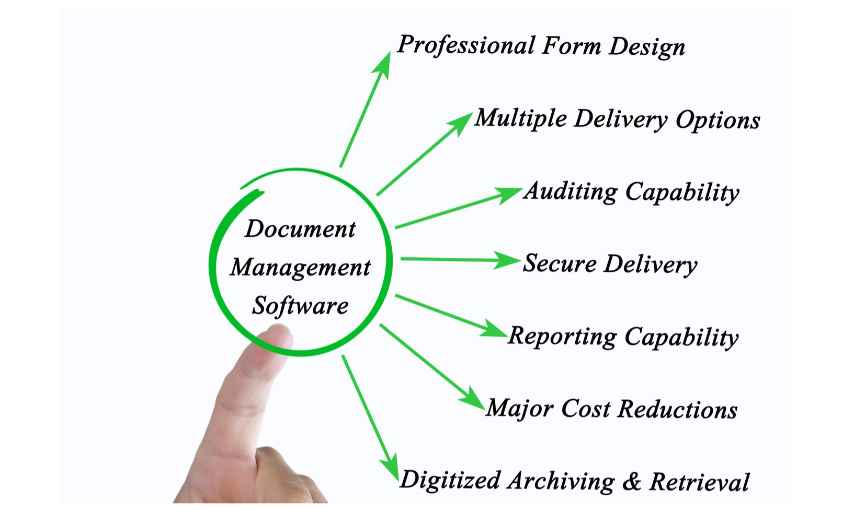
3. Document Management and Integration
Many business processes involve important documents, including invoices, contracts, employee records, application forms and customer information.
BPM software can integrate document management capabilities to organise these files and connect them with relevant workflows.
For example, when an employee submits a purchase request, supporting documents can be attached to the workflow and made available to authorised approvers.
Integration with document management systems also helps businesses maintain organised records and reduce unnecessary document duplication.
4. Role-Based Access Control
Not every employee should have access to every business document or process.
Role-based access control allows organisations to define permissions according to employee responsibilities.
For example:
- HR employees can access recruitment and employee records.
- Finance employees can manage invoices and payment approvals.
- Department managers can approve relevant requests.
- Administrators can manage workflow configurations.
This helps organisations protect confidential information and maintain better control over business operations.
5. Reporting and Analytics
BPM platforms provide reporting tools that help businesses understand how their workflows are performing.
Managers can monitor:
- Task completion rates.
- Pending approvals.
- Workflow processing times.
- Employee task assignments.
- Process bottlenecks.
- Overall operational performance.
These insights help management make informed decisions and identify opportunities for improvement.
6. System Integration
Businesses often use multiple applications for accounting, customer management, HR, document storage and communication.
BPM software can integrate with existing business applications through APIs and other integration methods.
This allows information to move between systems and reduces the need for employees to enter the same information repeatedly.
Benefits of BPM Software for Businesses
Implementing BPM software can improve business operations in several ways.
1. Improved Operational Efficiency
Manual processes often involve repetitive tasks, unnecessary communication and multiple approval stages.
BPM software helps standardise these activities and automate suitable tasks.
Employees spend less time following up on requests and managing routine administrative work.
2. Reduced Human Errors
Manual data entry, document handling and repeated information sharing can lead to mistakes.
Automated workflows help ensure that information follows predefined steps and that required approvals are completed before a process moves forward.
This improves consistency and reduces avoidable errors.
3. Better Collaboration Between Departments
Many business processes involve multiple departments.
For example, employee onboarding requires coordination between HR, IT, finance and department managers.
BPM software provides a shared workflow where authorised employees can view their responsibilities, access relevant information and track progress.
This reduces communication gaps and improves collaboration.
4. Greater Process Transparency
Without a centralised workflow, managers may struggle to understand the status of ongoing activities.
BPM software provides visibility into tasks, approvals and completed activities.
Employees can understand their responsibilities, while managers can identify delays and take appropriate action.
5. Improved Compliance and Accountability
Businesses in industries such as healthcare, finance, education and manufacturing often need to follow specific operational policies and documentation requirements.
BPM software can help organisations establish standardised workflows, maintain activity histories and control access to sensitive information.
These capabilities support internal accountability and compliance processes. However, businesses must configure their systems according to applicable regulatory requirements.
6. Scalability
As businesses grow, their operational requirements become more complicated.
A workflow that works for a team of five employees may not be suitable for an organisation with hundreds of employees and multiple departments.
BPM software allows businesses to adapt workflows, introduce additional approval levels and manage increasing workloads without depending entirely on manual coordination.
Real-World Examples of BPM Software
BPM software can be used across different industries and departments. Here are some practical examples.
1. Healthcare: Patient Registration and Records Management
Healthcare facilities handle large volumes of patient information, registration forms, medical reports and administrative documents.
A BPM system can streamline patient registration by creating a structured workflow.
For example:
- A patient submits a registration form.
- The reception team verifies the information.
- Relevant documents are attached to the patient record.
- The system forwards the information to the appropriate department.
- Authorised staff complete the required administrative steps.
This helps healthcare facilities organise administrative workflows and improve coordination between departments.
2. Banking: Loan Application Approval
Banks receive numerous loan applications that require verification and approval.
Without a structured system, applications may pass between multiple departments through emails and manual communication.
BPM software can automate the application workflow.
When a customer submits an application, the system can route it to the verification team, request additional documents when necessary and forward it to authorised officers for assessment.
Managers can also monitor pending applications and identify delays.
3. Human Resources: Employee Onboarding
Recruiting and onboarding employees involves several activities, including collecting personal information, verifying documents, creating employee accounts and arranging training.
BPM software can organise the entire process.
Once HR registers a new employee, the system can automatically create tasks for IT, finance and department managers.
Each department receives its assigned responsibilities and can update the workflow as tasks are completed.
4. Manufacturing: Purchase and Inventory Management
Manufacturing businesses depend on the timely availability of raw materials and equipment.
BPM software can help manage purchase requests, supplier approvals and procurement activities.
For example, when inventory reaches a predefined threshold, an integrated system can trigger a purchase request workflow.
The request can then move through the required approval stages before the procurement team places an order.
5. Education: Student Admission Management
Educational institutions manage applications, student documents, admission approvals and enrolment activities.
BPM software can create a structured admission workflow where applications are received, reviewed and forwarded to the appropriate departments.
Students and administrative teams can benefit from more organised processing and improved application tracking.
BPM Software vs Traditional Manual Processes
- Task Assignment: Traditional processes rely on manual emails and messages, whereas BPM software automatically assigns tasks to the appropriate employees.
- Document Approval: Traditional methods use paper forms and email chains, while BPM software streamlines approvals through digital workflows.
- Progress Tracking: Manual processes require regular follow-ups, whereas BPM software provides centralised dashboards to monitor task progress.
- Document Storage: Traditional systems often use disconnected folders, while BPM software helps organise and manage digital records.
- Reporting: Manual reporting requires employees to collect and prepare information, whereas BPM software can generate automated reports.
- Department Collaboration: Traditional processes involve repeated communication between departments, while BPM software enables teams to collaborate through shared workflows.
The main difference is that traditional processes depend heavily on manual coordination, whereas BPM software provides a structured environment for managing and improving activities.
How to Choose the Right BPM Software
Selecting the right BPM solution requires understanding your organisation’s operational needs.
Consider the following factors before making a decision:
1. Ease of Use: Choose software with an intuitive interface and visual workflow design capabilities.
2. Automation Capabilities: Check whether the platform can automate your important business activities, including approvals, notifications and document routing.
3. Integration Options: Ensure that the software can connect with your existing business applications and databases.
4. Security and Permissions: Look for role-based access, authentication, activity tracking and appropriate data protection capabilities.
5. Reporting and Analytics: Choose a platform that provides useful insights into workflow performance.
6. Scalability: Make sure the solution can support additional users, departments and workflows as your organisation grows.
7. Customisation: Every business has different operational requirements. Your BPM platform should allow workflows to be configured according to your business processes.
Conclusion
BPM software plays an important role in helping organisations streamline operations, automate repetitive activities and improve collaboration between departments.
From healthcare administration and banking approvals to employee onboarding and manufacturing operations, BPM solutions can manage a wide range of business processes.
By combining workflow automation, document management, reporting and system integration, organisations can reduce manual coordination and gain better visibility into their operations.
If your business still depends heavily on spreadsheets, email approvals and disconnected systems, implementing a suitable BPM solution could be an important step towards more organised and efficient operations.
Explore how bpmEdge BPMS can help your organisation manage workflows, automate business processes and improve operational efficiency.