
Large hospitals manage thousands of medical records, patient documents, diagnostic reports, prescriptions, consent forms, discharge summaries and administrative files every day. With multiple departments, doctors, nurses, specialists and administrative teams working together, managing this information efficiently is essential.
Many hospitals still rely on shared network drives, cloud storage folders and basic document-sharing systems to store and access important files. While these solutions may work for smaller healthcare facilities, they often become difficult to manage as hospitals grow.
Shared drives provide a place to store documents, but they are not designed to manage the entire document lifecycle. They often lack advanced document tracking, workflow automation, version control, access management and centralised document governance.
This is where a Document Management System (DMS) becomes valuable. A dedicated healthcare DMS software solution helps hospitals organise, manage, retrieve, secure and track medical records more efficiently.
Let’s explore why large hospitals need more than shared drives and how a DMS can improve healthcare document management.
1. Shared Drives Make Medical Record Management Complicated
Large hospitals generate an enormous volume of documents. These include patient admission forms, medical histories, laboratory reports, X-rays, insurance documents, prescriptions and discharge records.
When these files are stored across multiple shared folders, finding the correct document can become challenging.
For example, a doctor may need to access a patient’s previous diagnostic report before recommending further treatment. If the report is stored in an incorrectly named folder or saved across different departmental drives, locating it may take valuable time.
Common problems with shared drives include:
- Inconsistent folder structures across departments.
- Duplicate medical records and documents.
- Difficulties finding specific patient information.
- Documents saved with unclear or incorrect file names.
- Limited document categorisation and indexing.
- Time-consuming manual file organisation.
A DMS provides a centralised document repository where hospital staff can organise documents using metadata, categories, document types and other identifiers.
Instead of manually browsing multiple folders, authorised users can search for documents using relevant information, making retrieval faster and more convenient.
2. Hospitals Need Better Access Control and Document Security
Medical records contain highly confidential patient information. Hospitals must ensure that only authorised employees can access sensitive documents.
However, traditional shared drives may have limitations when managing permissions across large teams and multiple departments.
For example, a doctor may need access to patient medical histories, while the finance department may only require access to billing and insurance documents. Similarly, administrative staff may need access to selected patient records without having permission to view every confidential medical document.
Without appropriate access controls, hospitals may face risks such as:
- Unauthorised access to confidential records.
- Accidental modification or deletion of documents.
- Inappropriate sharing of sensitive information.
- Difficulty managing employee access when roles change.
- Limited visibility into document access activities.
A modern DMS provides role-based access control, allowing administrators to define who can view, edit, download, approve or share specific documents.
It can also provide access logs and audit trails to help hospitals monitor document-related activities.
These capabilities support stronger information governance and help healthcare organisations implement appropriate privacy and security controls. Hospitals must still configure their systems and processes to meet applicable privacy and regulatory requirements.
3. Document Version Control Is Essential in Healthcare
Medical documents are frequently updated. Doctors may add clinical notes, specialists may provide additional assessments, and administrative teams may update patient information.
When multiple employees work with the same document through a shared drive, different versions can quickly create confusion.
Consider a situation where a doctor downloads a patient’s medical history, makes changes and saves it as a new file. Another employee may continue working with an older version without realising that the document has already been updated.
This can create unnecessary administrative work and potentially affect clinical coordination.
A DMS helps manage document versions by maintaining a structured history of changes.
Depending on the software configuration, it can:
- Maintain previous document versions.
- Track document modifications.
- Record who made specific changes.
- Support document check-in and check-out.
- Help users identify the latest approved version.
- Reduce confusion caused by duplicate documents.
For hospitals, having access to the correct and current version of a document is particularly important for maintaining reliable medical records.
4. Manual Document Workflows Slow Down Hospital Operations
Hospitals depend on several document-based processes, including patient admissions, discharge approvals, insurance processing, medical record reviews and internal administrative approvals.
When these processes rely on emails, paper forms and shared folders, employees often need to follow up manually.
For example, a patient discharge document may need approval from multiple departments. If the document is emailed between employees, staff may struggle to determine who has reviewed it, who needs to approve it and whether the final version has been completed.
These manual processes can result in:
- Delayed document approvals.
- Repeated email communication.
- Missed follow-ups.
- Unclear approval responsibilities.
- Difficulty monitoring pending tasks.
A DMS with workflow automation capabilities can help streamline these activities.
Hospitals can configure workflows for document submission, review, approval and archiving. Notifications can alert relevant employees when an action is required.
This reduces repetitive administrative tasks and helps departments manage documents more systematically.
5. Faster Medical Record Retrieval Improves Staff Productivity
In a busy hospital environment, employees cannot afford to spend unnecessary time searching for documents.
Doctors, nurses, medical administrators and support teams frequently need access to patient information to complete their responsibilities.
If a hospital uses several disconnected storage locations, employees may need to contact other departments or request documents through email.
A DMS improves document retrieval through features such as:
- Full-text document search.
- Metadata-based searching.
- Patient or document identification.
- Document categorisation.
- Centralised storage.
- Advanced search filters.
For example, authorised staff may be able to search for a patient document using a patient ID, document category, date or other indexed information.
This can make it easier to retrieve relevant records without navigating through multiple folders.
The result is a more organised document management process and less time spent on repetitive administrative activities.
6. Audit Trails and Compliance Require Better Document Governance
Healthcare organisations must manage medical information responsibly and maintain appropriate records of document-related activities.
Depending on their location and operations, hospitals may need to follow requirements relating to patient privacy, medical record retention, information security and data protection.
Shared drives alone may not provide the document governance capabilities required by large healthcare organisations.
For example, hospital administrators may need to understand:
- Who accessed a particular document?
- When was a document modified?
- Who approved a specific record?
- Was a document deleted or moved?
- Which version was available at a particular time?
A DMS can provide audit trails that record important document activities.
It can also support document retention policies, controlled access, approval histories and structured archiving.
These features help hospitals maintain better visibility over their documents and support internal audits and compliance processes.
However, using DMS software does not automatically guarantee regulatory compliance. Hospitals must ensure that their document management policies, system configuration and security practices meet the applicable requirements.
7. Multiple Departments Need a Centralised Document Management Platform
Large hospitals rarely operate through a single department. They include emergency services, outpatient departments, intensive care units, radiology, pathology, pharmacy, administration, finance and several specialist departments.
Each department generates and manages different types of documents.
When departments maintain separate shared drives, information can become fragmented. Employees may struggle to identify where specific documents are stored or which department is responsible for maintaining them.
A centralised DMS helps bring document management activities into one structured platform.
For example, different hospital departments manage different types of documents:
- Patient Admissions: Registration forms and admission records.
- Radiology: Imaging reports and diagnostic documents.
- Pathology: Laboratory reports and test results.
- Pharmacy: Medication-related documentation.
- Finance: Billing and insurance documents.
- Administration: Policies, procedures and internal records.
- Human Resources: Employee records and contracts.
A centralised platform can improve document organisation while allowing each department to maintain appropriate access permissions.
It also helps hospital management establish consistent document management practices across different locations and teams.
8. Hospitals Need Scalable Document Management Solutions
As hospitals expand, their document management requirements also increase.
A hospital that initially manages a few thousand documents may eventually need to handle millions of files across multiple departments and locations.
Traditional shared drives can become increasingly difficult to manage at this scale.
Hospitals may experience storage management challenges, inconsistent folder structures, complicated permissions and increasing administrative workloads.
A scalable DMS helps healthcare organisations manage growing document volumes through centralised repositories, indexing, workflow automation and configurable access controls.
Some advanced solutions also support integrations with existing hospital systems, including Hospital Information Systems (HIS), Electronic Medical Records (EMR) and other healthcare applications.
This allows hospitals to improve document management without necessarily replacing every existing technology platform.
9. Why Hospitals Should Consider Dedicated DMS Software
A shared drive is primarily designed for storing and sharing files. A dedicated Document Management System (DMS), on the other hand, is designed to manage documents throughout their entire lifecycle.
While shared drives provide basic file storage and folder-based organisation, they may lack advanced document management capabilities required by large healthcare organisations.
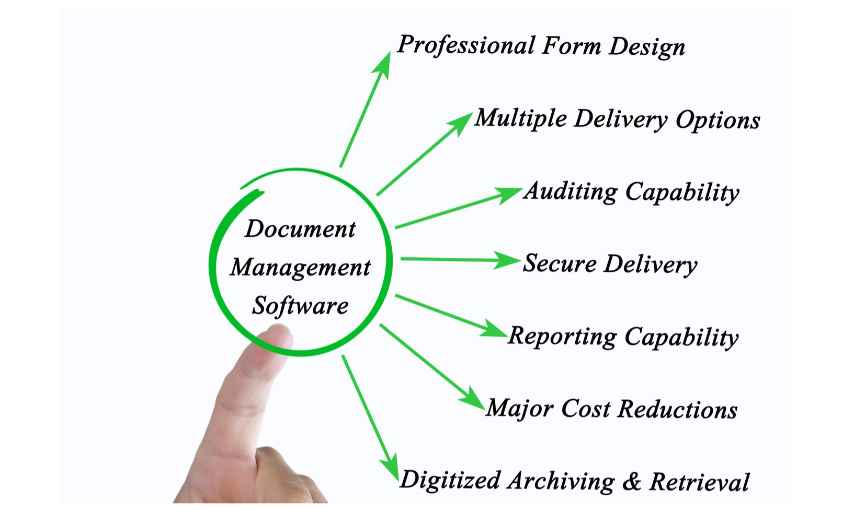
A dedicated DMS offers several advantages:
- Centralised document storage: Organise important hospital documents in a structured repository.
- Advanced document search: Find relevant records using metadata, indexing and search filters.
- Role-based access control: Manage document permissions according to employee roles and responsibilities.
- Version control: Maintain document histories and reduce confusion caused by outdated files.
- Workflow automation: Streamline document reviews, approvals and administrative processes.
- Audit trails: Track document-related activities and maintain better accountability.
- Document lifecycle management: Manage documents from creation and storage to retention and archiving.
By moving beyond basic shared drives, hospitals can establish a more organised, secure and efficient document management environment.
10. How docEdge DMS Can Help Hospitals Manage Medical Records
For large hospitals looking to move beyond traditional shared drives, docEdge DMS offers a dedicated approach to document management.
Instead of relying on disconnected folders and manual document handling, hospitals can use a structured document management platform to improve how information is stored, organised, accessed and managed.
With a suitable DMS implementation, healthcare organisations can benefit from:
- Centralised document storage: Organise important hospital documents in a structured repository.
- Advanced document search: Find relevant records using document information and indexing.
- Access management: Control document permissions based on employee roles and responsibilities.
- Version control: Maintain document histories and reduce confusion caused by outdated files.
- Workflow automation: Streamline document review, approval and other administrative processes.
- Audit trails: Maintain visibility into document-related activities.
- Improved collaboration: Help authorised employees access and work with relevant documents.
Hospitals can also evaluate integration options with their existing healthcare applications and IT infrastructure to support a more connected document management environment.
By introducing a dedicated DMS, hospitals can reduce their dependence on manual document handling and establish more organised information management practices.
Conclusion
Shared drives can be useful for basic file storage, but they may not provide everything a large hospital needs to manage complex medical records and departmental documents.
As healthcare organisations grow, they require better document security, advanced search capabilities, version control, workflow automation, audit trails and centralised document governance.
A dedicated Document Management System helps address these requirements by providing a more structured way to manage documents throughout their lifecycle.
For hospitals planning to modernise their document management processes, investing in a suitable DMS can be an important step towards improving operational efficiency, document accessibility and information governance.
Looking for a better way to manage hospital documents? Explore docEdge DMS to discover how dedicated document management software can help your organisation move beyond shared drives and manage important documents more efficiently.